STORAGE YOUR DOCUMENTS & PRESENTATIONS
Storage
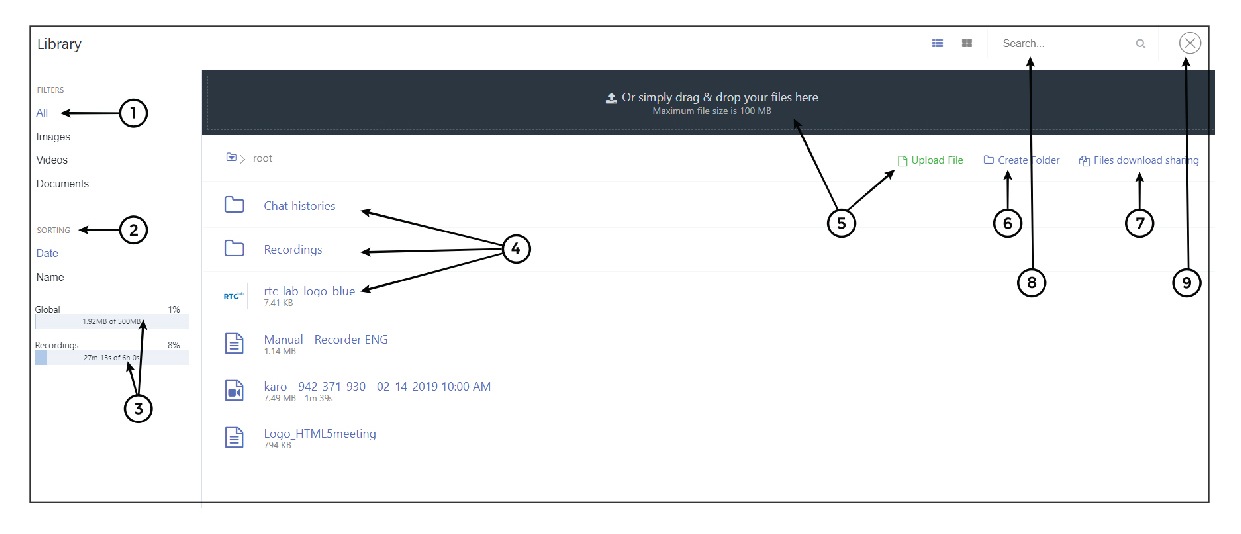
1. All your files - here you will have all the files you uploaded to Storage, divided into Images, Videos and Documents
2. Sorting - you can sort the documents by date or name
3. Free space indicator - the system shows you how much free space you have left on the Storage
4. List of your files - (see File Management)
5. Upload files – you can drag & drop the file to upload
it or click on “Upload file”
6. Create folder
7. Files download sharing – you can share your files with others
8. Search
9. Close
File Management
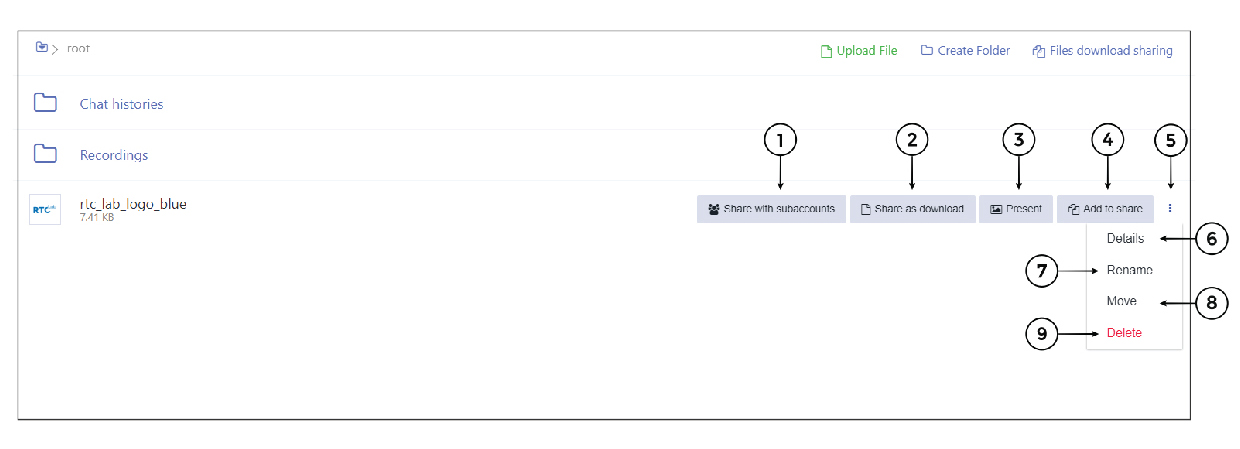
1. Share with Subaccounts - you can share files with your subaccounts, if you have any
2. Share as download - opens a window in the room where the participants can download the file
3. Present - turn on the presentation in the room
4. Add to Share - you can add many files at once to share them with your participants
5. Additional menu
6. Details - shows
you the details of the file
7. Rename
8. Move - you can move the file to another folder
9. Delete